# Alerts

## Summary

One of the unique "selling points" of DataFlint is the alerting system. \
Where in traditional spark monitoring you get a bunch of metrics and needs to figure out what they mean, with DataFlint you have alerts that points you to what is wrong and suggest you on potential fixes.

## Alerts

### Reading Small Files

<figure><img src="/files/LayPou983tGoPQGa2Str" alt=""><figcaption></figcaption></figure>

<figure><img src="/files/VUWDoK6WmV6aCM2CnOnL" alt=""><figcaption></figcaption></figure>

\[Also works for Apache Iceberg tables]

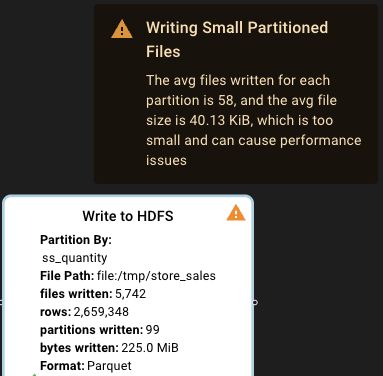
### Writing Small Files

<figure><img src="/files/FJxwmDrg4mmiIAKZFJNc" alt=""><figcaption></figcaption></figure>

<figure><img src="/files/ScOv2TK2niWS90Y5TnPn" alt=""><figcaption></figcaption></figure>

### Apache iceberg - inefficient replace of data

### &#x20;![](/files/gHjNdAblOgLYR36f61eK)

### Partition Skew

<figure><img src="/files/rDuuudpsliMUP9sFMEBe" alt=""><figcaption></figcaption></figure>

### Large Number Of Small Tasks

<figure><img src="/files/462I0LknEGy0DkTKdVQa" alt="" width="374"><figcaption></figcaption></figure>

<figure><img src="/files/4OQWeVMudwUNAbQlGCYI" alt=""><figcaption></figcaption></figure>

### Memory Over-Provisioning

<figure><img src="/files/vMqGQmniTTvtAHvxe4WX" alt=""><figcaption></figcaption></figure>

<figure><img src="/files/tR9cQPAWrCY4G9jyx6Vy" alt=""><figcaption></figcaption></figure>

### Memory Under-Provisioning

<figure><img src="/files/kV2JqRy2TTT7js3ffYga" alt=""><figcaption></figcaption></figure>

<figure><img src="/files/b40fHj7zzW5NShAiXKqF" alt=""><figcaption></figcaption></figure>

### High wasted cores rate

<figure><img src="/files/E3HwZzXwzpqUFDNs99mS" alt=""><figcaption></figcaption></figure>

<figure><img src="/files/WCVgc9bHnya5LsQ2EtoT" alt=""><figcaption></figcaption></figure>

### Large Data Broadcast

### &#x20;![](/files/SvycYKkRUnvnaJ6nQE2m)&#x20;

<figure><img src="/files/nbl573im2zrKfyypkjhy" alt=""><figcaption></figcaption></figure>

## Broadcast small table in Sort Merge Join

<figure><img src="/files/WtD7SobUfIFHWJxVIgGd" alt="" width="375"><figcaption></figcaption></figure>

## Large Cross Join Scan

<figure><img src="/files/FTVFyX7DAvUHe6j1shgt" alt="" width="375"><figcaption></figcaption></figure>

## Large Partition Size

<figure><img src="/files/2Ggs6k68S0wjOAdeb8d9" alt="" width="375"><figcaption></figcaption></figure>

## Long Filter Conditions

<figure><img src="/files/oaZ2488nvNUKlFb90e0T" alt="" width="375"><figcaption></figcaption></figure>

<figure><img src="/files/0aBUwDqbLlq7xMHgW5i1" alt=""><figcaption></figcaption></figure>

## Query Failures

Another type of "alert" is query failure. When hovering on the alert icon, DataFlint extract the error from the scary JVM stack trace and show it in the top of the message.

<figure><img src="/files/rDMjDeDsLi7FWvnGaXzU" alt=""><figcaption></figcaption></figure>

When you press the query you can see the exact place on the logical plan the query failed, in our case it's in the stage relates to writing files in the end of the query plan

<figure><img src="/files/Xt7zV3R3uG8KsWaMDjKC" alt=""><figcaption></figcaption></figure>

## Alerts roadmap

1. High task error rate
2. High executors error rate
3. High disk spill relative to input size and available memory.
4. repartition before write with low cardinality that causes lack of parallelism or huge files.
5. Executor memory overhead is too low and causes container failure


---

# Agent Instructions: Querying This Documentation

If you need additional information that is not directly available in this page, you can query the documentation dynamically by asking a question.

Perform an HTTP GET request on the current page URL with the `ask` query parameter:

```
GET https://dataflint.gitbook.io/dataflint-for-spark/advanced/alerts.md?ask=<question>
```

The question should be specific, self-contained, and written in natural language.
The response will contain a direct answer to the question and relevant excerpts and sources from the documentation.

Use this mechanism when the answer is not explicitly present in the current page, you need clarification or additional context, or you want to retrieve related documentation sections.
