> For the complete documentation index, see [llms.txt](https://dataflint.gitbook.io/dataflint-for-spark/llms.txt). Markdown versions of documentation pages are available by appending `.md` to page URLs; this page is available as [Markdown](https://dataflint.gitbook.io/dataflint-for-spark/integrations/delta-lake-integration.md).
# Delta Lake Integration
{% hint style="warning" %}
This feature is **experimental**
{% endhint %}
{% hint style="warning" %}
This feature is currently not working in Databricks in certain scenarios due to Databricks internal compatibility issues
{% endhint %}
### Overview
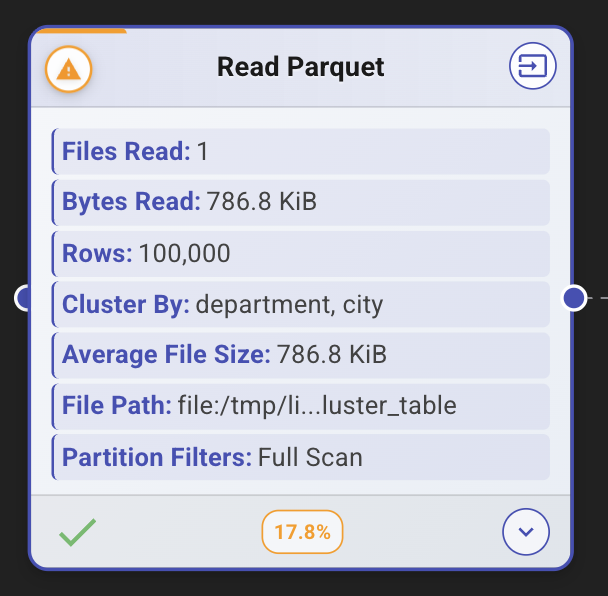
The Delta Lake Instrumentation feature in Dataflint provides deep visibility into Delta Lake table operations, automatically collecting and displaying metadata about table structure, optimization strategies, and access patterns. This feature helps identify performance optimization opportunities and understand how your Delta Lake tables are being accessed.
**Available in:** Dataflint v0.7.0+
### Usage Examples
#### Example 1: Partitioned Table Monitoring
```scala
// Create a partitioned Delta table
data.write
.format("delta")
.partitionBy("region", "status")
.mode("overwrite")
.save("/tmp/partitioned_table")
// Query with partition filter - Dataflint will show partition columns
val df = spark.read.format("delta").load("/tmp/partitioned_table")
.filter($"region" === "North" && $"status" === "Active")
// Check Dataflint UI to verify partition pruning is being used
```
#### Example 2: Z-Order Optimization Tracking
```scala
// Enable Z-Order field collection
spark.conf.set("spark.dataflint.instrument.deltalake.enabled", "true")
spark.conf.set("spark.dataflint.instrument.deltalake.collectZindexFields", "true")
// Create and optimize table with Z-Order
spark.sql("""
OPTIMIZE my_table
ZORDER BY (customer_id, transaction_date)
""")
// First query after OPTIMIZE - Dataflint detects and caches Z-Order columns
val df1 = spark.read.format("delta").table("my_table")
df1.filter($"customer_id" === 12345).show()
// Second query - Uses cached Z-Order metadata (no history scan)
val df2 = spark.read.format("delta").table("my_table")
df2.filter($"transaction_date" > "2025-01-01").show()=
```
#### Example 4: Liquid Clustering (Delta 3.0+)
```scala
// Create table with liquid clustering
spark.sql("""
CREATE TABLE clustered_events (
event_id BIGINT,
user_id STRING,
event_type STRING,
timestamp TIMESTAMP
)
USING DELTA
CLUSTER BY (event_type, user_id)
""")
// Insert and optimize
spark.sql("INSERT INTO clustered_events VALUES ...")
spark.sql("OPTIMIZE clustered_events")
// Query - Dataflint shows clustering columns
val df = spark.read.format("delta").table("clustered_events")
.filter($"event_type" === "purchase")
```
### What It Collects
The Delta Lake instrumentation automatically extracts and tracks the following metadata for each Delta Lake table scan:
* **Partition Columns**: Columns used for table partitioning
* **Liquid Clustering Columns**: Columns configured for liquid clustering (Delta Lake 3.0+ feature)
* **Z-Order Columns**: Columns that have been optimized using Z-Order
* **Table Path**: Physical location of the Delta table
* **Table Name**: Qualified table name (catalog.schema.table) when available
This information is displayed in the Dataflint UI alongside query execution details, making it easy to:
* Identify full table scans that could benefit from partitioning or clustering
* Verify that queries are using appropriate partition pruning
* Understand which tables have been optimized with Z-Order or liquid clustering
* Detect queries that don't leverage existing optimizations
### Configuration
#### Quick Start
To enable Delta Lake instrumentation, add the following configuration to your Spark application:
```scala
spark.conf.set("spark.dataflint.instrument.deltalake.enabled", "true")
```
Or when creating a SparkSession:
```scala
val spark = SparkSession
.builder()
.appName("MyApp")
.config("spark.plugins", "io.dataflint.spark.SparkDataflintPlugin")
.config("spark.dataflint.instrument.deltalake.enabled", "true")
.getOrCreate()
```
#### Configuration Options
| Configuration Key | Type | Default | Description |
| -------------------------------------------------------------------- | ------- | ------- | ----------------------------------------------------------------------------------------------------------------------------------------------------------------------------------------------------- |
| `spark.dataflint.instrument.deltalake.enabled` | Boolean | `false` | **Master switch** to enable/disable Delta Lake instrumentation. Must be set to `true` to activate the feature. |
| `spark.dataflint.instrument.deltalake.collectZindexFields` | Boolean | `false` | When enabled, scans Delta table history to detect Z-Order columns from OPTIMIZE operations. This may add overhead on first table access but results are cached. |
| `spark.dataflint.instrument.deltalake.cacheZindexFieldsToProperties` | Boolean | `true` | When enabled, caches discovered Z-Order columns as table properties (`dataflint.zorderFields`) to avoid re-scanning history on subsequent queries. Only applies when `collectZindexFields` is `true`. |
| `spark.dataflint.instrument.deltalake.historyLimit` | Integer | `1000` | Maximum number of Delta table history entries to scan when searching for Z-Order columns. Higher values provide more comprehensive detection but may increase processing time. |
#### Configuration Examples
**Minimal Configuration (Partition & Clustering Only)**
```scala
// Only collect partition and liquid clustering metadata (fastest)
spark.conf.set("spark.dataflint.instrument.deltalake.enabled", "true")
```
**Full Configuration (Including Z-Order Detection)**
```scala
// Collect all metadata including Z-Order columns with caching
spark.conf.set("spark.dataflint.instrument.deltalake.enabled", "true")
spark.conf.set("spark.dataflint.instrument.deltalake.collectZindexFields", "true")
spark.conf.set("spark.dataflint.instrument.deltalake.cacheZindexFieldsToProperties", "true")
```
**Custom History Limit**
```scala
// Collect Z-Order metadata but only scan last 500 history entries
spark.conf.set("spark.dataflint.instrument.deltalake.enabled", "true")
spark.conf.set("spark.dataflint.instrument.deltalake.collectZindexFields", "true")
spark.conf.set("spark.dataflint.instrument.deltalake.historyLimit", "500")
```
**Z-Order Detection Without Caching**
```scala
// Detect Z-Order but don't cache to table properties (useful for read-only environments)
spark.conf.set("spark.dataflint.instrument.deltalake.enabled", "true")
spark.conf.set("spark.dataflint.instrument.deltalake.collectZindexFields", "true")
spark.conf.set("spark.dataflint.instrument.deltalake.cacheZindexFieldsToProperties", "false")
```
### How It Works
#### Architecture
The Delta Lake instrumentation uses a Spark listener (`DeltaLakeInstrumentationListener`) that:
1. **Intercepts SQL Execution Events**: Monitors `SparkListenerSQLExecutionStart` events
2. **Identifies Delta Scans**: Parses the physical plan to find Delta Lake table scans
3. **Extracts Metadata**: Uses reflection to access Delta Lake internals and extract table metadata
4. **Caches Results**: Stores metadata to avoid repeated extraction for the same table
5. **Posts Events**: Publishes collected metadata to Dataflint's storage for UI display
#### Reflection-Based Approach
The instrumentation uses reflection to support both:
* **Open-source Delta Lake** (`org.apache.spark.sql.delta.DeltaLog`)
* **Databricks Runtime** (`com.databricks.sql.transaction.tahoe.DeltaLog`)
This ensures compatibility across different Delta Lake distributions without requiring specific dependencies.
#### Metadata Collection Process
**Partition Columns**
* **Source**: Delta table metadata (`Metadata.partitionColumns`)
* **Performance**: Instant (no additional I/O)
* **Always Available**: Yes
**Liquid Clustering Columns**
* **Source**: Delta table snapshot clustering metadata domain
* **Performance**: Instant (no additional I/O)
* **Availability**: Delta Lake 3.0+ with liquid clustering enabled
* **Returns**: Both logical column names and physical column names
**Z-Order Columns**
* **Source**: Delta table history (scans for OPTIMIZE ZORDER operations)
* **Performance**:
* First access: Scans table history (configurable limit)
* Subsequent access: Instant (uses cached value from table properties)
* **Caching**: Results stored in `dataflint.zorderFields` table property
* **Availability**: Only when `collectZindexFields` is enabled
#### Caching Strategy
The instrumentation implements intelligent caching to minimize overhead:
1. **Per-Application Cache**: Tracks processed table paths in memory to avoid duplicate processing within the same Spark application
2. **Table Properties Cache**: Stores Z-Order columns in Delta table properties for persistence across applications
3. **Cache Invalidation**: Automatically resets cache when `OPTIMIZE` operations are detected
**Cache Behavior:**
* Empty cache value (`""`) indicates the table has been checked and has no Z-Order columns
* Missing cache means the table hasn't been analyzed yet
* Cache is only written when `cacheZindexFieldsToProperties` is `true`
### Performance Considerations
#### Overhead
The instrumentation is designed to minimize performance impact:
| Operation | Overhead | When |
| ------------------------------ | -------------------------- | -------------------------------------------------- |
| Partition column extraction | Negligible | Every first scan of a table |
| Clustering column extraction | Negligible | Every first scan of a table |
| Z-Order detection (first time) | Low to Moderate (100ms-2s) | First scan after enabling, depends on history size |
| Z-Order detection (cached) | Negligible | Subsequent scans (reads from table properties) |
| Per-query overhead | None | After initial metadata collection |
#### Best Practices
1. **Enable Z-Order Collection Selectively**: If you don't use Z-Order optimization, keep `collectZindexFields` disabled
2. **Tune History Limit**: Set `historyLimit` based on your table's history size and Z-Order frequency
3. **Use Caching**: Keep `cacheZindexFieldsToProperties` enabled to avoid repeated history scans
4. **Monitor First Query**: The first query after enabling may take slightly longer due to metadata collection
### Troubleshooting
#### Z-Order Columns Not Detected
**Symptoms**: Z-Order columns show as empty even though table has been optimized
**Solutions**:
1. Verify `collectZindexFields` is enabled:
```scala
spark.conf.set("spark.dataflint.instrument.deltalake.collectZindexFields", "true")
```
2. Check if OPTIMIZE operation is in history limit:
```scala
spark.conf.set("spark.dataflint.instrument.deltalake.historyLimit", "2000")
```
3. Manually check table history:
```scala
spark.sql("DESCRIBE HISTORY my_table").show(false)
```
#### Clustering Columns Not Appearing
**Symptoms**: Liquid clustering columns not displayed
**Possible Causes**:
* Table doesn't have liquid clustering configured
* Using Delta Lake version < 3.0
* Table was created without `CLUSTER BY` clause
**Verification**:
```scala
spark.sql("DESCRIBE DETAIL my_table").show(false)
// Check for clusteringColumns field
```
#### Performance Impact
**Symptoms**: First query takes longer than expected
**Solutions**:
1. Reduce history limit:
```scala
spark.conf.set("spark.dataflint.instrument.deltalake.historyLimit", "500")
```
2. Disable Z-Order collection if not needed:
```scala
spark.conf.set("spark.dataflint.instrument.deltalake.collectZindexFields", "false")
```
3. Check Spark logs for timing information:
```
DeltaLakeInstrumentationListener - processing took XXXms
```
#### Permission Issues
**Symptoms**: Errors when trying to cache Z-Order fields
**Error Message**: `Failed to set z-order metadata for table`
**Solutions**:
1. Disable caching in read-only environments:
```scala
spark.conf.set("spark.dataflint.instrument.deltalake.cacheZindexFieldsToProperties", "false")
```
2. Ensure Spark user has ALTER TABLE permissions
### Advanced Topics
#### Custom Table Property
Z-Order columns are cached using the custom table property `dataflint.zorderFields`:
```scala
// View cached Z-Order fields
spark.sql("SHOW TBLPROPERTIES my_table('dataflint.zorderFields')").show()
// Manually set Z-Order fields (if needed)
spark.sql("""
ALTER TABLE my_table
SET TBLPROPERTIES ('dataflint.zorderFields' = 'col1,col2')
""")
// Clear cached Z-Order fields (forces re-detection)
spark.sql("""
ALTER TABLE my_table
UNSET TBLPROPERTIES ('dataflint.zorderFields')
""")
```
### Support
For issues, questions, or feature requests:
* GitHub Issues:
* Documentation:
* Email: